 B-Admin-Time
Split Court Costs with Friends
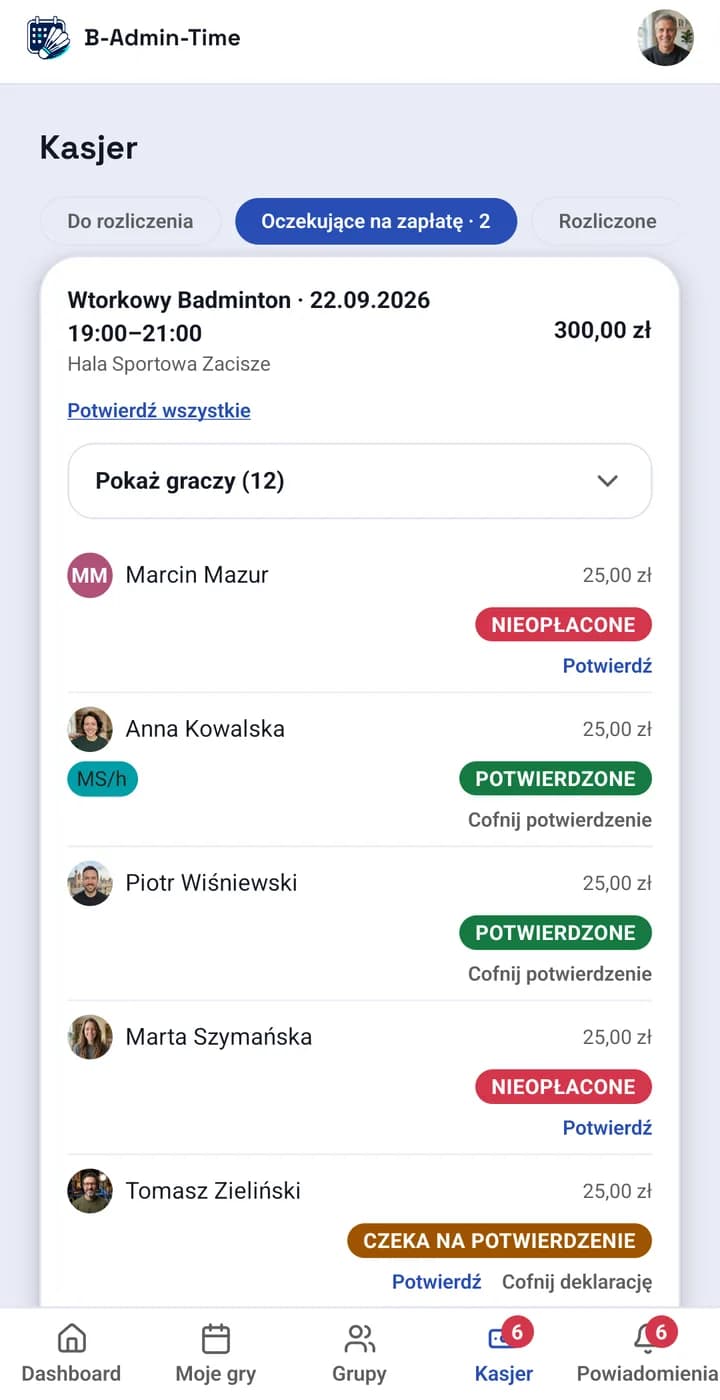
In B-Admin-Time every session has a payment status per player — the group’s cashier sees at a glance who has paid, who has declared a payment, and who still owes, without copying data into a spreadsheet after every session.
Why a spreadsheet doesn’t scale
With 5-6 people a spreadsheet is enough. With 20-30 people and several sessions a week it turns into a second job — you have to remember who has a sports benefit card (e.g. Multisport), who is a guest, who paid cash on the spot and who sent a transfer a week later. Mistakes are easy, and fixing one in the spreadsheet tells nobody anything unless they dig through the change history.
How it works in B-Admin-Time
- Every player in a session has a visible status: unpaid / declared / confirmed.
- The type of sports card — for example one limited to 1 entry a day, or only to the hour played — shows as a badge next to the player, so the cashier knows whether a top-up is due.
- The cashier confirms payments one by one or in bulk for the whole session.
- Guest settlements are kept separate from those of regular group members (adding guests is part of the Regular and Pro plans).
Settle up in your group’s currency
- The admin picks the group’s currency: złoty, euro, pound sterling, hryvnia, Swiss franc or another European currency. The default is złoty.
- Every session remembers its currency. When the group switches currency, sessions that already have amounts stay in the old one and new sessions use the new one.
- If your history spans several currencies, totals and cashier summaries show amounts separately per currency — nothing is converted at an exchange rate.
- The “Pay with Revolut” button works in the session’s currency; the bank-transfer QR code (a Polish banking standard) is available for złoty.
Settlements work together with sign-ups and the waitlist — the same session view shows who is playing and who has paid for it. See also how to set up court price lists and discounts for sports cards, or the comparison with a spreadsheet and group chat.
We describe the individual mechanisms in detail on the blog: how the session cost is calculated, settlement modes for sports cards, no-show penalties and fees for late cancellation and late payment.
“The Cashier feature is a big help: it makes it easy to split the court cost, report a payment and confirm it. The system is well configurable and can automatically block people who haven’t paid for a game, so the organizer doesn’t have to chase settlements by hand.”
No card required. No commitment.
Frequently asked questions
How do I settle up with a guest who isn’t a group member?
A guest is added to the session by the person who invited them, with their own payment status and — if relevant — their own card type (Multisport or similar pass). A guest’s settlement is not mixed with those of regular members. Adding guests is available from the Regular plan.
What if someone pays with a benefit card instead of cash?
The card type shows as a badge next to the player — an “hourly” pass covers only one hour of play, a “daily” pass covers the whole session regardless of how long it lasts. The cashier sees right away whether a player should pay anything extra or whether their entry is covered by the card.
Who can confirm payments in the group?
A group admin assigns the cashier role. The cashier sees a combined view of all unsettled sessions and can confirm payments one by one or in bulk.
Can a group settle up in euros or another currency than złoty?
Yes. The admin sets the group’s currency in its settings — you can choose złoty, hryvnia, euro, pound sterling, Swiss franc and other European currencies, including the Czech koruna, Hungarian forint, Romanian leu and the Swedish, Norwegian and Danish kroner. Group currency works on every plan and doesn’t depend on the currency you pay your subscription in.
Which plan includes settlements?
Settlements and the cashier role are available on every plan, including the cheapest, Lite.